Problem
Find the factorial of a number using Modified Stirling's formula(Gospers). Also print the difference upto 5 decimals between the result from the factorial function in Matlab and the result you get from approximations.The relation to find the factorial of a number using the Stirling's formula is given by:
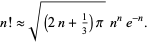 |
| Gospers formula(Modified Stirling formula) |
Solution
We will solve this problem using Matlab functions. This is similar to our previous post Velocity of a moving fluid using Matlab. But the little difference between the previous post and this post is that we are required to print the difference upto five decimals of the difference between the factorial function in matlab and the above formula.
It should be remembered that we are asked indirectly to print the modulus of the difference. To know about modulus of a number then please do check out mathcenter website
Program is written in a simple manner so that it is easy to understand, also explanation section is written to make a detailed explanation of the program. Please do check out explanation section if you want a detailed explanation of the program. To solve this problem some of the concepts you need to know are as follows:
1) Matlab functions
2) Matlab comments
3) Matlab Variables
4) factorial of a number
5) abs function
6) fprintf in Matlab
1) Matlab functions
2) Matlab comments
3) Matlab Variables
4) factorial of a number
5) abs function
6) fprintf in Matlab
Program
 1
 2
 3
 4
 5
 6
 7
 8
 9
10
11
12
13
14
15
16
17 | function gosper = stirlings(n) %This function will calculate the factorial of a %number using the modified stirlings formula or %gospers formula %Use this function as follows: %>> stirlings(n) %Where n is the number you want the value of the factorial gosper = sqrt((2*n+(1/3))*pi)*((n^n)*exp(-n)); real = factorial(n); difference = abs(gosper - real); fprintf('The difference between real and gosper approximation is: \n'); fprintf('%.5f\n',difference); end |
Explanation
Line 1: We have initiated the function with the return value gosper and the name as stirlings whose parameter(s) are only a number.
Line 2-7: They are matlab comments and they can also be called as the documentation of the function. You can get the documentation of the function by typing the following in the command window:
>> help stirlings
And the result will be as follows:
Line 9: We are creating a variable named gosper and storing the value of the matlab equivalent of the given equation in the question. To know why I have made many parenthesis around each number then you need to understand about Matlab operator precedence.
 |
| Stirlings approximation using Matlab |
Line11: I am calculating the value of the factorial using the factorial function of the Matlab.
Line 13: The difference between the value of the factorial function and the value of the value calculated from the gospers formula is calculated. I have also added the modulus of to the number so that we only get a positive value of the number. Read about the abs function in Matlab to know more about the modulus of a number using matlab.
Line15-16 the difference is printed using fprintf function.
Input/Output
 |
| Modified Stirlings approximation using Matlab |
Try it yourself
1)Write a program to ask the user to give two options. Option 1 stating that the value of the factorial is calculated using unmodified stirlings formula and Option 2 using modified stirlings formula. According to the user input calculate the same. Stirling formula. Stirlings formula is as follows:
 |
| Stirlings formula for factorial of a number |
Final Note
I have tried to explain every part in this post so that it is easy for everyone to understand. If you have any doubt or couldn't understand anything then please do comment below or do contact me. Contact me from here: contact me.
The above program was high lighted using hilite.me.
Keywords: stirlings, gosper, approximation, factorial, abs function