Problem
Find the area and eccentricity of the ellipse using simple if else and also using functions in Matlab. The relations for eccentricity and area of ellipse are given below:
 |
| Area of ellipse equation |
 |
| Eccentricity of ellipse formula |
1) Math is fun
Solution
As we have already seen many basic programs lets make this a little bit difficult about 0.1 star difficulty from other problems. Remember we are now not adding difficulty in the Matlab program but we are adding difficulty in terms of math. We will see more difficult problems in Matlab soon. Stay tuned for difficult problems.
In this problems we will ask the user to give the value of a and b. Then we will check if the user has not entered any value of b less than zero. Because length cannot be negative. And similarly we will check if the user has not entered the value of a less than or equal to 0. Because as the given equation has a in denominator youtif the user enters 0 then we get the value of ellipse as infinity or undefined. So Also we know that the length cannot be less than zero. Both combined we will get that a ≥ 0.
Then we will calculate the area and eccentricity of the ellipse.
Remember that we will calculate the area of the ellipse even if the user has entered the value of a to zero, But we will say that the eccentricity is not defined.
I suggest you to refer to the program first and then refer to the explanation section to get detailed explanation of the program. Some of the concepts used to solve this problem are as follows:
1) Request user input using input function
2) if elseif and else statements in Matlab
3) sqrt function
4) Functions in Matlab
5) Matlab Comments
1) Request user input using input function
2) if elseif and else statements in Matlab
3) sqrt function
4) Functions in Matlab
5) Matlab Comments
Program
1 2 3 4 5 6 7 8 9 10 11 12 13 14 15 16 | a = input('Enter the length of semi major axis (a): '); b = input('Enter the length of semi minor axis (b): '); if a == 0 fprintf('a cannot be equal to zero') area = pi*a*b; fprintf('area: %.4f\n',area); elseif a<0 || b<0 fprintf('a or b is less than zero! This is not the case with ellipse!\n'); elseif b>a fprintf('a cannot be less than b. a is major axis, b is minor axis!\n') else area = pi*a*b; e = sqrt(1-(b^2/a^2)); fprintf('Area: %.4f, e = %.4f\n',area,e); end |
Explanation
Line 1&2: We are asking the user to enter the value of a and b for calculations.
Line 4-7: As we have discussed in the solution section a cannot be zero so we are initiating the if statement and checking and checking whether the value of a is equal to zero. As we know that the area can be calculated if the value of a is zero but the eccentricity cannot be calculated we are calculating the area of the ellipse and displaying it to the user using the fprintf statement.
Line 8-9: Here we are using the elseif to check if the user has entered any value of a and b less than zero, because length cannot be less than zero. We are using the fprintf to display the user that they have entered wrong values.
Line 10-11: As it is ellipse the value of major axis is always greater than or equal to the minor axis. This condition cannot be violated. So we are checking this condition here using the elseif and displaying the user that they have made a mistake by typing value b>a.
Line 12-15: If all the above conditions are false then the program gets executed and the value of the area and eccentricity are calculated and the user is displayed with a neat output of area and eccentricity(e).
Program - functional approach
1 2 3 4 5 6 7 8 9 10 11 12 13 14 15 16 17 18 19 20 21 22 23 24 | function [area,e] = ellipse_fun(a,b) %This function will calculate the area %and the eccentricity of an ellipse if all the %conditions for a real ellipse are met. %Function usage: %ellipse_fun(a,b) % %Where a - Semi major axis %b - Semi minor axis if a == 0 area = pi*a*b; e = false; elseif a<0 || b<0 area = false; e = false; elseif b>a area = pi*a*b; e = false; else area = pi*a*b; e = sqrt(1-(b^2/a^2)); end end |
Explanation - functional approach
This program is also same as the previous program but here we are using function so that the user can use the function in any other program. In the above program we are stating that the return variables will be area and e and the input parameters for the function ellipse_fun will be a and b. And in the similar way we have changed the if else statements so that there will only be output of the return variables and not any other stuff. That's it you have written a function which will calculate the area and eccentricity of an ellipse if the user gives correct input!Input/Output
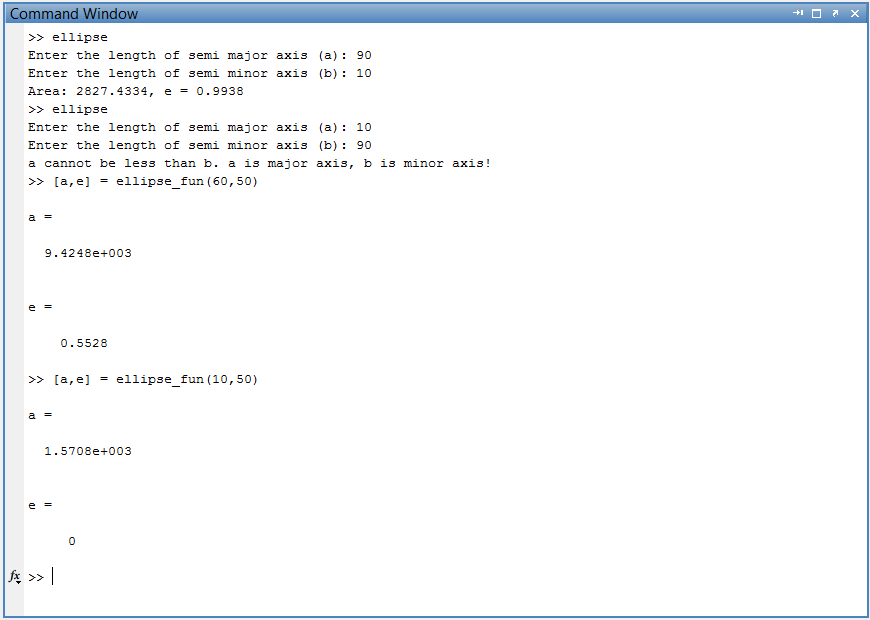 |
| Matlab session - Calculate the area and eccentricity of ellipse |
Try it yourself
1) Check what happens if a = b? Comment your answer in the comment box below.
2) Try to write a program in such a way that if the user has entered of major axis less than minor axis, intimate the user that you have swapped the values and swap the values to calculate the area and eccentricity of ellipse. (Swapping - Exchange of the values of a and b).
Final Note
I have tried to explain everything in this post in such a way that it is easy to understand. If you have not understood anything or have a doubt, then please do contact me or comment in the comment box below. You can contact me from here: Contact me
The above program was highlighted using hilite.me we app
Keywords: ellipse, eccentricity