Convergents of e
The square root of 2 can be written as an infinite continued fraction. $$ \begin{equation} \sqrt{2} = 1 + \cfrac{1}{2 + \cfrac{1}{2 + \cfrac{1}{2 + \cfrac{1}{2....} } } } \end{equation} $$ The infinite continued fraction can be written, $ \sqrt{2} = [1;(2)]$, (2) indicates that 2 repeats ad infinitum. In a similar way, $\sqrt{23} = [4;(1,3,1,8)]$.
It turns out that the sequence of partial values of continued fractions for square roots provide the best rational approximations. Let us consider the convergents for $\sqrt{2}$. \begin{equation} 1 + \cfrac{1}{2} = \cfrac{3}{2}\end{equation} \begin{equation} 1 + \cfrac{1}{2 + \cfrac{1}{2}} = \cfrac{7}{5} \end{equation} \begin{equation} 1 + \cfrac{1}{2 + \cfrac{1}{2 + \cfrac{1}{2} } } = \cfrac{17}{12} \end{equation} \begin{equation} \sqrt{2} = 1 + \cfrac{1}{2 + \cfrac{1}{2 + \cfrac{1}{2 + \cfrac{1}{2} } } } = \cfrac{41}{29} \end{equation} Hence the sequence of the first ten convergents for $\sqrt{2}$ are:
$1, \cfrac{3}{2}, \cfrac{7}{5}, \cfrac{17}{12}, \cfrac{41}{29},\cfrac{99}{70}, \cfrac{239}{169}, \cfrac{577}{408}, \cfrac{1393}{985}, \cfrac{3363}{2378}, ...$
What is most surprising is that the important mathematical constant,
$e = [2; 1,2,1, 1,4,1, 1,6,1 , ... , 1,2k,1, ...]$.
The first ten terms in the sequence of convergents for e are:
$2, 3, \cfrac{8}{3}, \cfrac{11}{4}, \cfrac{19}{7}, \cfrac{87}{32},\cfrac{106}{39}, \cfrac{193}{71}, \cfrac{1264}{465}, \cfrac{1457}{536},...$
The sum of digits in the numerator of the 10th convergent is 1+4+5+7=17.
Find the sum of digits in the numerator of the 100th convergent of the continued fraction for e.
Generating the values inside the continued fraction for $ e $ is easy because the same has been given in the question. The tricky part in this problem is to convert a kind of mixed fraction to a simple fraction.
The best way to understand the algorithm is by taking an example.
Consider that we will have to find the value of simple fraction for the continued fraction:
\begin{equation} 3 + \cfrac{1}{5 + \cfrac{1}{9 + \cfrac{1}{4 + \cfrac{1}{2} } } } \end{equation}And representing the Continued fraction in terms of [] we can write the above continued fraction as:
$$
[3; 5, 9, 4, 2]
$$
To find the simple fraction, we will start from the last element $2$.
Now $4 + \cfrac{1}{2} = \cfrac{9}{2}$
Continuing further we have $9 + \cfrac{1}{\cfrac{9}{2}} = 9 + \cfrac{2}{9} = \cfrac{83}{9}$
$\implies 5 + \cfrac{1}{\cfrac{83}{9}} = 5 + \cfrac{9}{83} = \cfrac{424}{83}$
$\implies 3 + \cfrac{1}{\cfrac{424}{83}} = 3 + \cfrac{83}{424} = \cfrac{1355}{424}$
A very big number and a lot of calculation! But I hope you have understood the point.
If you have observed, for every step in solving we are reversing the numerator and the denominator.
Based on our experience till now we will write a function which will take three inputs, numerator, denominator and the number to which this is to be added.
# http://radiusofcircle.blogspot.com
def continued_fraction_inv(a, numerator, denominator):
    return a*denominator+numerator, denominator
For example to find the total fractional value of $5 + \cfrac{83}{507}$ we will give a = 5, numerator = 83, denominator = 507. We will see this in action.
You can download the code from Github Gist continued_fraction_inv.py
print continued_fraction_inv(5, 83, 507)
The output is as expected. We are getting the same result as we have when calculated using pen and paper. This is the main concept of the algorithm which I have used to solve this problem.
Program
# http://radiusofcircle.blogspot.com

# time module
import time

# time at the start of program execution
start = time.time()

# exponent continued fraction
e = [2,]

# iterator
i = 1

# while loop to get 100 numbered list
while len(e) < 100:
    e.extend([1, 2*i, 1])
    i += 1

# initial numerator
numerator = 1

# last number of the list as denominator
denominator = e.pop()

# looping through the list to get the convergents
for i in e[::-1]:
    denominator, numerator =  (denominator * i + numerator, denominator)

# finding the answer
# remember denominator is the new numerator
print sum([int(digit) for digit in str(denominator)])

# time at the end of program execution
end = time.time()

# print total time taken
print end - start
The program is very much simple. As we have discussed in the previous section, for each and every iteration denominator will become the numerator and vice versa. Also at the end we are using the denominator to find the solution. To get a clear cut understanding of what is happening behind the scenes, you can do two things:
- Print the value for of numerator and denominator for each and every iteration
- Reduce the list size upto 5 elements and write the output for each and every iteration.
My suggestion would be to choose the second option.
You can download the program from here: Github Gist pep65.py
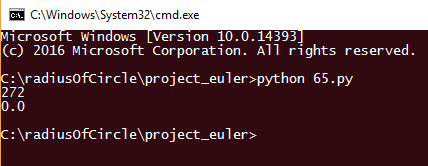
Output

Summary
As most of the data have already been given in the question, solving the problem was relatively easier. When I first attempted to solve this problem I didn't read the question properly and tried finding the CF of exponent using other methods. After a few trials I read the question once again and it worked. The solution was already in the question. I am well satisfied with the execution time of the program.
If you have any doubt or didn't understand anything, comment in the comment box below and I will be glad to help you.
If you have found a typo or have a better/different approach to solving this problem, please share your code in the comment box below and I will very happy to see your comment.
You can also contact me.
Thank you. Have a nice day😃.